Curvy blues

27.Oct.2007

I was looking in the past (and some more) at various solutions for efficient hardware-aided curve rasterization methods. Those ideas mostly focused on using the graphical hardware for accelerating the geometry generation process. But what happens, when we completely skip the geometry generation step? Even more blazing performance and totally resolution-independent rendering. Thanks to some tips by Jon and interesting math discussions I had in the past weeks, I’m glad to present my current thinking.

Quadratic curves

Quadratic curves (second-degree polynomials) consist of a starting point, an end point and one control point. Such curves cannot self-intersect nor inflect. The representation of a quadratic curve is a parabola, a straight line or (a degenerate case) – a point. Quadratic curves are not the most popular ones in modern graphical packages. Cubic types (more about them later) are the basic unit of notation. In example, cairo doesn’t provide direct quadratic API. It’s understandable as any quadratic can be trivially represented in a cubic form. However, since (due to their limited properties) quadratics are usually much faster to process it makes sense to look at them separately. Quadratics are part of the SVG standard and have some interesting uses – including TrueType fonts (which are represented only with 2nd degree curves) and Flash (which uses quadratics as the native curve representation and represents cubics by subdividing them into quadratics). Few examples of quadratic curves:
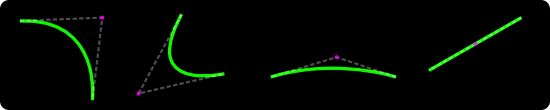
Quadratic curve examples

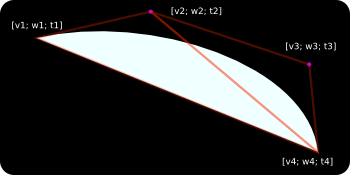
Now, let’s look at how we can hook up the programmable GPU hardware to rasterize quadratics. The first observation is that the three points describing the curve form a triangle and this triangle covers the whole area of the curve. Triangle is the most basicrasterization primitive in modern graphics hardware. Let’s assign two texture coordinates (v and w) for each of the three points. We’re going to use [0.0; 0.5] , [0.0; 1.0] and [1.0; 1.0] for, respectively – the start point, the control point and the end point.
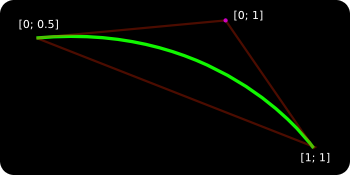
Quadratic triangle

As the triangle is being rendered the hardware will interpolate v and w across the three vertices. For each pixel belonging to the triangle we get a unique, interpolated v and w texture coords pair. And here comes the crucial part – as the actual “texture” for this triangle we use a dynamic fragment program that evaluates the following expression:
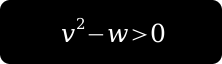
Quadratic shader expression

If the expression evaluates to true, we pass the pixel. If not, we discard it. What we get is:
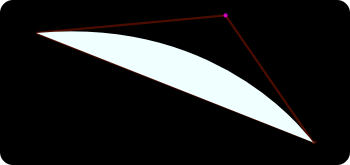
Quadratic shader rendering

Here is a shader implementation that does this operation. As we see, the rastered picture represents the curve we’re trying to visualize. To be precise, we get the fill for the curve. If we replaced the < sign with = sign we would get the actual stroke (the green line). As we zoom towards the curve, the shader generates more pixels giving a more accurate representation. A true resolution-independent rendering.

I'm going to come back to why this is so fundamentally amazing later on, but now let's move on to the cubics.

Cubic curves

Cubics (third-degree polynomials, the bezier-curves) are a bit more complex. They consist of two arbitrary control points plus start/end points. As a result a cubic can self-intersect, loop, inflect or cusp. Beziers are the thing in vector drawing and most of the data we get to render these days (icons, buttons, UI elements...) are sets of shapes defined by cubic curves.
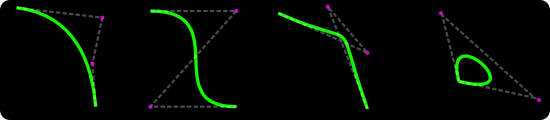
Cubic curve examples

For blazing-fast rendering of cubics we’re going to use a similar approach that we used for quadratics. Since cubics consist of four points we need more than a single triangle. Actually, depending on the control points set we’re dealing with, we need 2 or 3 triangles. In other words – we need to triangulate the points. In this case (very fixed) triangulation is trivial and essentially we can discover the case we have by doing a few dot products between the vectors of the control points.
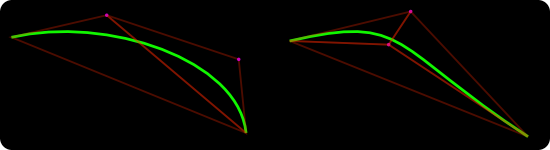
Cubic curve triangulation

Since we’re dealing with a cubic equation, we need three texture coordinates per point (that’s perfectly fine with the OpenGL API). Let’s call those three coords: v, w and t. In our fragment shader (implementation here) we’re going to evaluate the following expression:
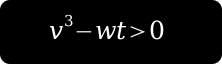
Cubic shader expression

And the last hard part – unlike quadratics, for cubics there are no static texture coords to use. We need to calculate them separately for each curve. The method to do that is a subject for a separate article, but it’s enough to say that it’s a fast fixed-time operation that involves few matrix multiplications. Essentially we need to put the control point coordinates in a matrix, move it to power basis and analyze the determinants. Depending on the number of square roots, we have one of the few distinct cubic-cases which further dictate which v, w, t coords to use. Those computations could be put in hardware-accelerated matrix pipeline but I haven’t found that to be critical enough to do so.

In the end we end up with:
Cubic shader rendering

Using this technique we can render any cubic at any resolution in a fixed time.

Practical results

Two following screenshots (click for bigger versions) show sample renderings (a font glyph and a mono-project logo) obtained using this method. Shapes consist of roughly 30 cubics/lines. The first figure represents the inner-mesh hardware-accelerated triangulation. The second one – a rendering of the curve data. By combining the two we end up with a final mask for the shape. This method works for any polygon including complex self-intersecting concave/convex shapes.


GPU font rendering

GPU mono logo shape rendering

Why it’s cool

  • Traditional approaches to curve rasterization usually require recursive subdividing of the curve towards a certain level of line-approximation or reaching a pixel-precision. The complexity/processing time grows exponentially and the result might be not correct. With the approach presented above we achieve high quality by keeping the mathematically-correct (not compromised) information about the curve till the very last step – the rasterization . The precision of the final image (output) is only limited by the resolution of the display system, not the implementation. The complexity of the algorithm is linear and the processing time is only constrained by the pixel fill rate of the GPU board (that value approaching hundreds of millions for modern equipment).
  • From my experiments, attaching the (presented) fragment shaders to the triangle rasterization process has no any impact on the performance. In other words, it seems that on modern hardware rendering a solid-filled triangle is equally fast as rendering a triangle with a simple shader.
  • As we’re not generating/storing any extra geometry data and just using two (max three) triangles per curve, the memory requirements are minimal – even for extremally complex shapes.
  • By using some additional extensions (such as a compiled vertex array) after the initial pre-calculation step we can completely move the geometry data to the GPU unit and render by just invoking display lists. In this case the expose events theoretically come cost-free for the CPU.

Smart curve rasterization is the first step towards efficient drawing API implementation. By combining the solution with additional dynamical GPU-programmable pipeline elements (gradients, triangulation, anti-aliasing, multi-sample rendering) we can achieve blazing-fast vector-based drawing tool. This is my current approach towards building a new OpenGL-based cairo backend. World domination follows. Obviously.

Update: for better math overview check this article by Loop & Blinn. It’s a good starting point even though it’s not complete and has certain mistakes (check comments).

22 Comments

This totally kicks ass. Rock on!

It’s awesome to see mind boggling mathematics presented in such an pwetty way. You rock, Michael.

This is very cool stuff :) Would using a method like this with a software-based polygon rasteriser be faster than the current subdivision method?

Fab. More please.

Way cool. Does that mean gecko finally gets to be blazing fast? Or even just fast? Pretty please ;-)

You can easily do really high quality anti-aliasing too. Just plug the distance to the edge into a smoothish function that goes from 1 to 0 along some curve to get the coverage. You could use a texture, or just some simple mathematical expression. Or, by computing the exact coverage (intersect the curve with the square of the current pixel in the shader), though I would really guess that a simple clamped quadratic curve could give you pretty much indistinguishable results. Something like ( sign(dist)*(2*dist)^2 + 0.5 ), where the dist is the distance in pixels from the center of the current pixel.

You should Patent this Method (no joke), before some big company does.

Michael,

Thank you!

That is a very cool article, and I think that it is wonderful that you are writing an OpenGL Cairo renderer. My application (still in very early prototype stages) uses Cairo to render its output, and the performance is an issue at the moment (I think that Cairo uses software rendering currently, right?). If you can produce a nice fast Cairo renderer, it will be wonderful.

Thanks.

Awesome, very creative and useful!

@chris lord: I think a software-based rasteriser is fill-rate limited, and with a clever enough algorithm you don’t have to check for each pixel whether it’s inside the shape. So in the end, I think there will not be much speedup if we use only the CPU. But MDK might have more to say on that.

Awesome! This is really good news for us interested in integrating cairo for drawing user interfaces in our 3d engines. Keep it up!

How about non-zero stroke widths?

@tommi: I’m not sure if gecko’s current (real) bottlenecks are in drawing. My gut-feeling is that a lot could be achieved by just doing smart caching. But of course accelerating whole website rendering would be… well, a holy-grail worth questing for ;)

@goeffrey: yes, cairo uses software rendering. There is an (unmaintained) glitz GL-backend but in practice it’s slower than software rendering.

@sebastien: Yes, it’s true. But unfortunately, it gets a bit more complex than that. To avoid triangulation and provide easy ways of implementing gradients/source bitmaps etc. we need first to draw to a 1bit off-screen (hw) mask. Since this is, well, 1bit we can’t do anti-alising at this step. One obvious solution is to use multi-sampling. It yields great, high-quality results (higher than ie. cairo x-backend I’d say). Since multisampling is not so popular among low/medium-end GPU hardware, we need to do something smart with another shader during the process of blitting the mask to screen. Trying to figure this out at the moment.

@abbas: Most of this stuff has been known/described for ages, even before the first real computers were produced. Check out the works by Delaunay and De Casteljau.

@chris, thomas: I agree with thomas, in many cases the over-draw would kill the performance. But maybe going for integer processing + low-level ops would be of some use. Checking performance with software GL rendering would be a nice place to start.

@jtin: I used “=” more as a metaphor. You’d actually want to do something like: abs (expression) > stroke-width. To be even more precise, even for strokes it makes more sense to create an actual path/shape that represents the stroke. This is because you want to avoid blending anomalies at intersection points, etc. Also, it would be required for implementing capping, stroke styles, etc.

This is interesting stuff. Charles Loop & Jim Blinn wrote a great paper describing this method here: http://research.microsoft.com/~cloop/loopblinn05.pdf

I believe this method was used in the game Forza 2 (xbox360) for resolution independent text rendering.

Well you could store an 8-bit coverage mask, possibly in the destination alpha, (along with setting the stencil buffer for the 1-bit mask - any pixel not killed will be set) and then use that 8-bit coverage mask as alpha for a final compositing step where you take the results of all the other steps and blit it to the final location (by rendering a quad with alpha blending). That way you can use the stencil buffer to do any sort of tricks you want (I’m not 100% sure why you need it, you could just compose a custom shader on the fly, with caching of course, to do everything you need in one step - gradients, textures, high-quality anti-aliasing, you name it), and then still get the really high quality anti-aliasing without having to increas the fill rate (this obviously only works for 2D scenarios where two objects won’t intersect along the Z-axis - one will always be completely in front of the other).

That is extraordinarily clever. Good luck with the fast, high quality anti-aliasing.

@sebastien: I was thinking along those lines also. I was actually considering using the accumulation buffer for something. The 1bit stencil invert buffering is the key here – by using it, we can skip totallly the triangulation and all the (very, very CPU-intensive) calculations required to compute the inner areas of the shape. We can also completely ignore all the (fairly complex) issues related to limited precision errors, float boundries etc.

We would love love LOVE to have a good GL backend for cairo in Gecko. We are often drawing-limited especially in fancy new SVG-using apps, but also in many image and text-heavy pages that are animated or when you scroll against a fixed background.

This is great stuff, but I would like to see credit to the original authors. As @brandon said this is exactly the way Charles Loop & Jim Blinn describe the “Resolution Independent Curve Rendering using Programmable Graphics Hardware”, all the implementation details and the math background can be found there.

@pplux: you’re right, I put the reference to the article in the post. However, the article by Loop & Blinn has many technical mistakes. The part about quadratics is correct, but:

  • The Delaunay triangulation step is completely unnecessary and would kill the performance. It’s an extremally expensive operation that generates a lot of additional geometry data and makes things complex. By using the stencil buffer masking we can completely skip it. With full triangulation the method has a limited use for pretty much only static data (fonts?).

  • The math part about cubics is also not complete and doesn’t cover all the cases. Even for integral cubics there are more cases than the ones being mentioned and flipping rules are not dependant only on the d1 determinant. I recommend http://portal.acm.org/citation.cfm?id=77056 for better overview, unfortunately it’s not a free resource.

  • One important step is the curve normalization. From what I’ve seen most hardware seems to have a limited precision tex coord interpolation methods. To avoid the rendering anomalies we need to normalize curves in some steps of the processing.

How were you planning on dealing with antialiasing mdk?

This is awesome stuff. Earlier in the year I started working on vector graphics stuff for XNA. I have a couple of shaders for gradient brushes (a few “features” still remain). But it got a bit much for me. There is not much info out there about coding vector graphics, the only info I got was from looking at libs like cairo. The only GPU based vector graphics stuff I found is the article by Loop & Blinn and your few posts. And to tell you the truth it’s a little over my head at the moment.

So I wish you luck in your endeavours….. so I can take the easy way out and just port it :)

I agree this is terrific. I agree most of this stuff is old hat (mathematically).

Just note that the original authors of the referenced paper (Blinn and Loop) have indeed patented this (or at least doing it on a GPU): http://www.freepatentsonline.com/20070097123.html

Yes, they assigned it to “some big company” they work for… :-(

Sorry, comments are closed for this article.

back to top

Powered by Mephisto with a micro theme mod