06.Aug.2007
Some time ago I had a chance to talk to Zack Rusin about the differences between QT and the Gnome/Gtk drawing stack. Zack was showing some impressive visual toolkit demos using tiny fractions of the CPU horse power. One of the subjects we started arguing about was using GPU hardware to perform tessellation – as opposed to cairo, where tessellation happens always on the software side. The idea seemed tempting though the practical benefits were unclear to me.
During GUADEC I poked a few people about the possibility of using OpenGL and shader programs with cairo to perform hw-accelerated tessellation. I got some constructive and interesting (yet discouraging) feedback about the problems and complications related to this approach. A lot of those (highly valid) points are summarized by Tim Janik in his blog. Still, the possible gains/performance improvements were highly unclear.
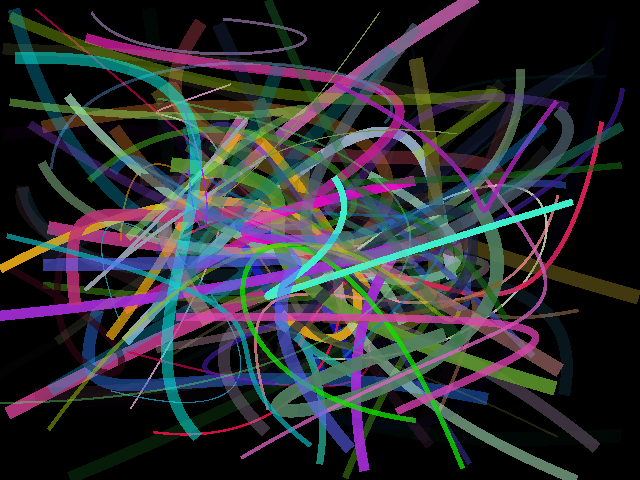
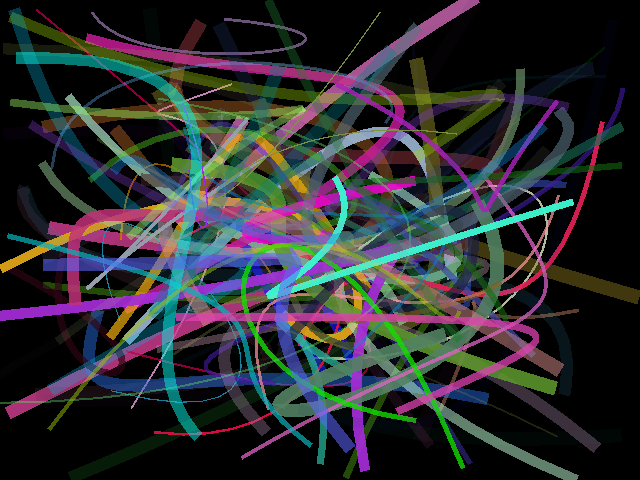
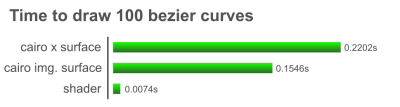
I therefore decided to write a small benchmark to see what kind of speed differences we could possibly be talking about. To see if the game is worth playing at all. As the testbed I’ve chosen one of the most fundamental bits of the vector graphics – a bezier curve drawing algorithm. I implemented a 100% hw-accelerated version as a vertex shader program running on the GPU. I compared it against cairo software version in two scenarios – using xsurface and image surface. The following setup was used for the test:

The rough-rough result of the test is that drawing using hardware opengl tessellation is 30 times faster than current software cairo implementation. By overlying the resulting images in ie. GIMP one can see tiny pixel differences between the two implementations (cairo implementation begin prolly more accurate) but essentially it’s the same thing. The OpenGL shader implementation is not optimized at all and could be made faster by using a geometry shader instead of a vertex shader.
Using GPU to perform things normally happening on the CPU has one additional advantage – it frees the processor to do other things. In my setup, with the cairo implementation drawing random curves as fast as possible, I can get a ~10fps animation (100 curves per frame). This keeps the CPU busy at 100% and the framerate will drop as soon as CPU starts doing anything else.
With my 100% GPU implementation I get around 400fps and the CPU usage never goes beyond the 30% threshold (lots of it being the random-number generation I presume).
I still think that the results are interesting though. I quickly hacked another shader implementation to draw solid-filled bezier shapes (more about that soon). The performance differences seem to be even bigger. My gut feeling here is that the programmable hardware drawing might be the only way to go for the resolution-independent fully vector-drawn UI’s. Especially on the mobile where the CPU power is scarce, it scales badly, and everything that doesn’t throttle the processor means longer battery life.
Powered by Mephisto with a micro theme mod
15 Comments
Chasing pixel perfect reproducibility is a hopeless goal. The only way to achieve it is to use exactly the same software rendering library on all targets. That method achieves reproducibility by having everyone use exactly the same code.
It’s not going to happen with hardware based drawing. Because of patents all the chips implement the drawing algorithms slightly differently but not different enough that it really matters. This is not an OpenGL only problem. It you draw hardware lines using the X server they exhibit the same problem.
Shaders are the future of graphics for the next decade. Too bad Linux will still be stuck with Render and a framebuffer while other environments fully exploit shaders.
Are non-antialiased bezier curves really a relevant drawing operation for performance testing? I certainly don’t have any of those on my display currently.
Your findings don’t come as a surprise. I fully support moving all desktop-rendering to GL on the free desktop, thus pushing for more solid GL-drivers across all chips. It’s really a shame to see OSX and Windows pulling far ahead in terms of adoption of hardware-acceleration of their desktop-graphics stacks, while on the free desktop some “need” for pixel-perfect-correctness is holding back the next logical step (well part of that is the poor support of solid GL-drivers across the board), which is embracing GL. I don’t really understand this need for pixel-correctness. It’s not that the differences are large between different GL-implentations. This is especially of lesser concern since we are moving to even larger displays and higher DPI, I think.
If you’ve not done it yet, I can give it a try and hack up some bezier-curve drawing using a geometry-shader.
wants its graphics back..
Why turn antialising off in cairo, surely thats the interesting and relevant bit (and replicating that with a shader). Without AA you may as well compare XPlotPixel vs a shader.
@Eric: Maybe because your system would be unusable if you did have them? :-)
Eric, your screen is full of bezier curves in the glyphs,
Hi Michael,
I’m definitely quite interested in anything that speeds up graphics rendering. If we’re talking about the future, I definitely don’t agree with ” cairo, where tessellation happens always on the software side”. If we can get good tessellation implemented by the hardware, then I would be quite glad to make cairo use it.
A few points:
As has been mentioned, non-antialiased rendering isn’t interesting for cairo, (as far as I’m concerned anyway).
You may have noticed only “tiny pixel differences” in your testing with the gimp, but your results do show larger problems than that. Instead of piling up dozens of random splines, draw a single spline with some extreme curvature, (that is, where it’s almost “folding back” on itself). There are examples of these in your screenshot and they lose their “roundedness”, and the spline is also getting blended with itself as it “folds back”. These aren’t just “pixel differences”, but are 50-100% errors in a number of pixels that is linear with the square of the line width. Now, it may very well be that fixing those bugs doesn’t slow the implementation down, (for example, cairo has a linear-time algorithm for computing the correct result given a piecewise-linear approximation of both the spline and the “pen”).
Drawing a single Bézier spline is not the “tessellation” problem in cairo. This point is perhaps not relevant to your results, since if you ask cairo to draw a single spline it shouldn’t invoke its tessellator at all. But, to be clear, the tessellation problem that cairo has is to accept a complex (self-intersecting) polygon and cover it with a number of non-intersecting simple polygons, (according to either the even-odd or winding rule).
Keep up the good work, and please join us on the cairo mailing list if you have more interesting things to share in the future:
Thanks,
-Carl
Alex and Jon,
Eric said “non antialiased Bézier curves”. I have lots of Bézier curves on my display now, but like Eric, I don’t have any without antialiasing, (excepting in Michael’s screenshot).
-Carl
Are you really measuring hardware vs software here, or just the current state of Cario’s X backend on Linux? [Which, as I understand it, is rather craptastic compared to Windows and even OS X] It would be interesting to see what the Cairo (and OpenGL!) numbers look like under Windows, on the same system.
Carl and Micheal,
I just wanted to query whether or not the strict pixel precision in cairo is really a necessity for outputting things to the screen fast. I’m starting to see the possibility of a new cairo surface coming along here (oh please god replace glitz!) and it seems that its not 100% important to have 100% pixel precision for elements which are likely to move.
Shifting off work to the GPU is always great work, especially if it is a demo like this, and whatever MacSlow will be throwing out there soon… Inspiring demos increase velocity :)
Regarding the pixel differences between the two versions, you can easily minimize them by adding 0.5 to the x coordinates in the cairo implementation:
Alternatively, you can subtract 0.5 from the x coordinate in the shader implementation. If you overlay the two images, you will find that they are more similar once the x coordinates are adjusted. Don’t ask me why, though. 0.5 was just my initial guess and happens to work well.
The main differences that remain after that adjustment are in the sharp curves and in the way cairo and the shader draw self-intersecting curves: apparently, the shader considers the opacity for each segment of the curve (thus making it more opaque when the curve overlaps with itself) while cairo only does it once for the curve as a whole.
Karl Lattimer about 16 hours later:
What strict pixel precision in cairo? Cairo has multiple backends and the backends do not have pixel-perfect agreement in their rendering, (nor is that a requirement at all).
All I care about is that the cairo backends produce “visually identical” results. That is, if it looks correct, it is correct, (the long-time graphics mantra).
Certainly not. The more things are moving, the less important it is to have precise rendering.
Cairo currently does not have much in the way of knobs for getting better performance at the cost of quality, (cairosettolerance is one, but it’s quite mild compared to what you could imagine). But that’s more because not much demand/code has been presented for this kind of thing. It’s definitely not the case that we’d reject such a thing from cairo.
Now, personally, I don’t get excited about code that produces ugly results—so I haven’t written much of that, but that’s just me. And code that gets high-quality results while also being very fast is extremely interesting. So that’s where my efforts will continue to go.
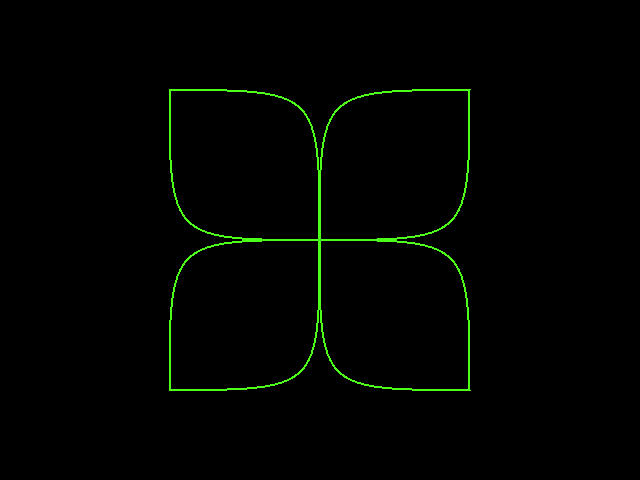
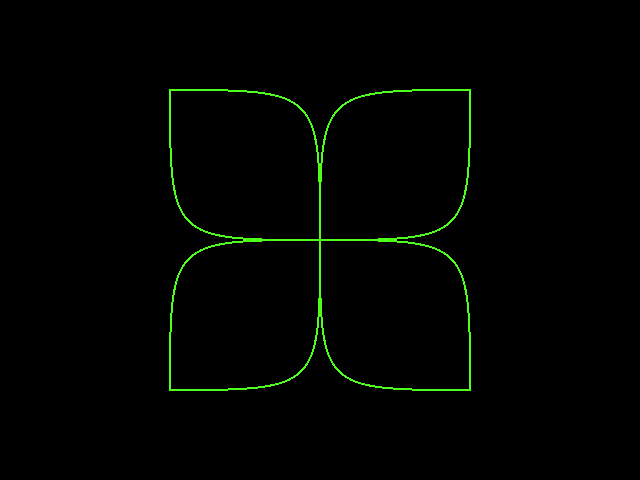
As an aside, what did you use to generate the graph?
Thanks for interesting comments guys.
@Carl: Aliased rendering is not totally redundant nowadays. With high-resolution displays (ie. the 225dpi screen we have in N800) in many cases aliased rendering looks better than anti-aliased rendering. This will become even more evident as the dpi goes up in future. But it’s also true that anti-aliased rendering is a more common use case nowadays.
I mentioned tessellation as in my implementation I convert the actual bezier line into triangles/quads. I guess cairo does it differently. For the polygon rendering&tesselation I’m going to post my findings/implementation soon.
@Justin: I included also a benchmark of the cairo image surface backend that doesn’t go through X. Speaking about the GL on Linux vs. GL on Windows – there might be some differences coming from the fact that (at least ATI) OpenGL drivers on Windows have better quality. I haven’t heard about significant perf. differences between Cairo on X and cairo on Windows, but maybe Carl can say more.
@Raphael: That’s an interesting question (drawing intersecting curves). I guess cairo implementation makes more sense. This could be easily fixed.
@Eric: I’ve drawn the graph myself with cairo.
Hi, very interesting post, and thank you for upload the code.
If you have interest, I have “migrated” the Cg shader to a GLSL one. It is a little dirty, but you can get this on my blog (although it is almost the same):
http://blogs.igalia.com/apinheiro/2007/08/10/reviving-glsl/
Sorry, comments are closed for this article.