GL colorspace conversions
17 Nov 2007 » permalink
A fellow sushi-lover MacSlow was blogging some time ago about various cool things that can be done with OpenGL and video. Mirco writes:
“The remaining things to implement are: using fragment-shaders for the colorspace-conversion too, hooking up some implicit-animation love for switching between different videos.”
I'd like to pick a little bit on the first part of his todo (using hardware-accelerated colorspace conversions).
RGB vs. YUV
Computer graphics is an RGB-world. Every point/pixel on the screen is represented by an intensity of red, green and blue. Any visible color can be coded with a combination of those three values. RGB is the way to specify colors in various drawing API’s, HTML color coding, etc. However — RGB gamut is not modeling well the way human eye works. Our perception has certain characteristics that are not well expressed in the RGB universe. For example — a human eye is very sensitive to changes in lightness (intensity) but is not very keen on noticing differences between dark shades of blue. This is where YUV colorspace kicks in. YUV (just like RGB) can be used to represent any color but the representation is more interesting from the video compression point of view — which is mostly about benefiting from the imperfections in our sight.
In YUV colors are represented by luminance (Y) and two chrominance components (U and V). For example, in RGB the white color is represented with [1.0; 1.0; 1.0] triple while in YUV it would be a [1.0; 0.0; 0.0] set. In a way YUV predates RGB and computers as it’s the format used in the analog TV (the cable essentially contains YUV signals at different bands).
Conversion
The reason why YUV is important is that it’s used as the native format in video compression. The raw (fast) output we get from a modern video decoder is a (some kind of) YUV buffer. YUV can be fairly easily converted to RGB (and vice versa) but it comes at a price. Since it’s a per-pixel operation the processing time gets steep fast. With high-resolution DVD-quality video we’re talking about ~10 million points per second. With numbers like that any operation becomes a bottleneck. Since in the end we somehow need to get the RGB representation, the only thing we can do is delegate the conversion from the CPU to the graphical hardware.
Overlays to the rescue
The traditional way of dealing with this problem was to use overlay capabilities of the graphics board. Overlays are around since long time (way longer than 3d acceleration) and are fairly well established. Overlays, being a hardware capability, allow us to “take over” a certain (more or less rectangular) area of the screen and dump there some pixel data — bypassing the traditional drawing pipeline. The data pushed can be in YUV format. Modern graphics hardware supports all popular YUV formats and the conversion is handled by the hardware.
The limitation of this approach is that the video (overlay) is not really a first-class citizen in the UI pipeline. It’s something that is (simplification here) “burnt over” other elements of the UI. We can’t transform it, we can’t use it in the 3d/2d effects pipeline and it’s problematic (slow) to draw over it (think transparent playback controls drawn over playing video). Overlays are more than enough for implementing standard desktop players but are useless when we want to do more fancy stuff.
For the fancy effects we want to use video as a native texture/source image while still delegating the colorspace conversion to the hardware. OpenGL API/pipeline does not support YUV formats but we can easily fix that with custom GPU code.
YUV formats
One problem with YUV is that it comes in different flavors (formats) and there are quite many of them. FourCC website has a good overview. The good thing is that there are just a couple of popular formats used in practice and the huge rest is mostly exotic or legacy.
Let’s take a quick look at the popular IYUV/I420 format we get from a DivX decoder. It’s a planar format which means that (unlike most RGB formats) the components are not interleaved. We can graphically represent an I420 buffer:
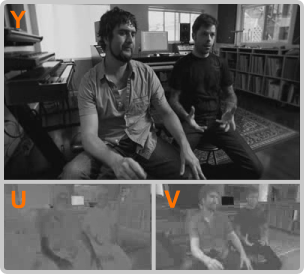
The buffer contains the full Y plane followed by two U and V planes. And here comes the rub — the U and V planes are sub-sampled at half the resolution. So, assuming we’re dealing with a 400x240 video we first get the luminance (Y) plane at full resolution (400x240) followed by U/V planes at half the resolution (200x120). Again, this is because the information about the lightness of the picture (Y) is more important than the information about the chrominance (“colors”) of the video. In other YUV formats it’s common to assign less bits for the U and V.
GL implementation
In the GL implementation we particularly want to:
- Avoid any data processing on the software side
- Avoid extra mem copies/unpacking of the data
- Benefit from the hw-accelerated scaling/filtering (linear, cubic, etc.)
- Get a high-quality image
To achieve this we need to use three GL elements which are not part of the GL 1.x standard but are commonly available as extensions — multitexturing, fragment programs and rectangular texture.
Multi-texturing allows us to use three different textures (Y, U and V plane respectively) as the source for the output image. A custom fragment shader executes the proper blending function to create the RGB data out of the YUV source. Rectangular texture is necessary to be able to use non-power-of-two resolution source as the texture.
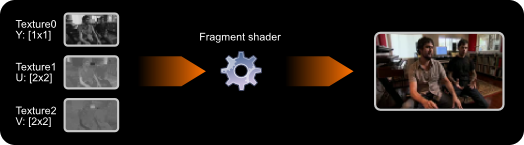
For the textures/planes we use a GL_LUMINANCE 1-byte texture format. We also need to use a separate set of texture coordinates for each plane due to the resolution differences. The texture-filtering step (ie. during scaling) happens before the shading step so in the shader we automatically get properly filtered data (each texture separately).
For other YUV formats (ie. the interleaved ones) we need to do a bit more work. As the UV components are usually scattered across many triples automatic GL scaling/filtering will destroy our data before it reaches the shader. To counter that we need to first draw (with hw-accelerated conversion) to an off-screen FBO/texture and reuse that data as a native RGB texture for further rendering in the UI/scene. Alternatively one can use pbuffers (less optimal performance-wise).
Source code
Here is an example program + source which renders a sample video (Nokia n810 ad) using GStreamer + hardware-accelerated colorspace conversion and some effects. The example uses a rather primitive way of syncing video using timers. The proper way would be to write a decent GStreamer video sink or extend the existing GL-sink to use fragment programs. This approach would prolly be the right way to handle video in ie. clutter.
A rendering of the program output just for reference (might not show up in RSS, full resolution video can be downloaded here):
 Syndicate