05.Aug.2005
This week I managed to bind all the various DIVA elements together and make them play nicely. I’ve got the skeleton of the video editor pretty much working.
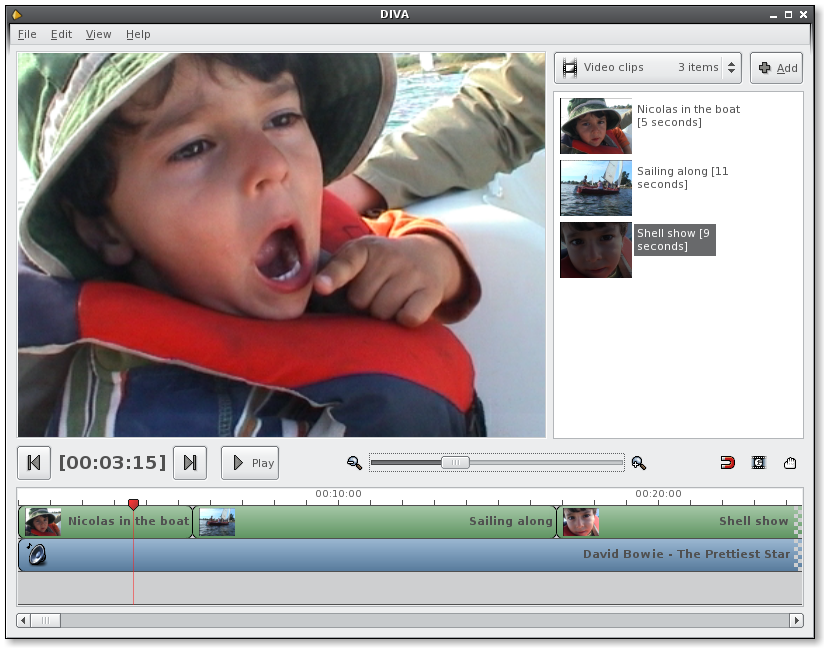
On the second shot you can see the frames mode which is very usefull.
This is by no means a final interface, just a draft. I’m not so much satisfied with the “MyStuffBin” in the upper right corner. It’ll get more options soon. Also, a lot of small icon toggles will appear here&there. But I’d like to keep the main window pretty simple and uncluttered.
Perhaps I already noted that – I’m amazed by the GStreamer’s overall performance.
Powered by Mephisto with a micro theme mod
25 Comments
Wow, this is taking shape - quickly and very nicely! Good work :) Only comment is I feel that a toolbar should be added - what do you think on that?
Nice to see you making so much progress!
I only want to do some feedback, I’m very interested on your project and I’m very expectant with DIVA; as much that I’ve postput a little own project until first release :)
My english is poor, I’m sorry but I’m spanish
Good luck!
Awesome!! We really need a program like this in Linux. You’re right on track in terms of making something that looks functional and competitive with the major commercial consumer apps. Are you able to render video yet or is that still some time away? Keep it up, I’m cheering you all along!!
Great work, well done!
Do you have a package of this code? When you plan to release it? I wanted to see it in action on my own computer. :)
It looks awesome!!!
I can’t wait to start playing with it, keep up the good work. It looks like it will be winner as Linux desperatly needs something like this.
Woohooo!!
It’s wonderful! Does it work under windows?
This program will have three points that I consider essencial in a desktop:
Just like GNOME. And that’s what’s special about it. Even when not considering Freedom, most programs of this kind are cluttered and with a lot of unneeded features. I just hate the Windows’ programs philosophy: try to find the option you want in the Winamp preferences and you’ll know what i’m talking about.
WoW, Looking very nice, well done :)
The interface looks very nice and simple, hope you’ll try to keep it (the UI) simple and clean, with the addition of features.
good luck and keep up the great work!
Hmmm. Michael certainly knows how to hype up the crowd. :)
Don’t give up, you’re totally aiming the direction.
> Do you have a package of this code? When you plan to release it? > I wanted to see it in action on my own computer. :)
If you are man enough to compile it yourself ;) I suggest you fetch it from SVN:
http://forge.novell.com/modules/xfmod/svn/svnbrowse.php?repname=diva
>If you are man enough to compile it yourself ;) I suggest you fetch it from >SVN:
Well, I’d suggest not to test your manhood with that right now ;) It’ll give you a lot of headache. At the moment this code is far from being usable. A lot of things are hard-coded (resolutions, framerates…) for my files I’m using for testing. Also, It depends on some exotic stuff (gtk-sharp-2 API 2.6, gdk-pixbuf gst plugin) that you’ll have to compile yourself from CVS.
So I’d suggest to wait a bit more. In the upcoming week I’m going to focus on resolving all the hard-coded issues and making it generally working. I hope to make a “pre-pre-pre-pre release package” with some “get-it-to-work” HowTo quite soon.
>Are you able to render video yet or is that still some time away?
Yes, the video is rendered using the XOverlay - directly to the memory of your video board. That means it’s pretty fast (as fast as GStreamer is). The “play” button doesn’t work yet, but you can move the “time” slider along the timeline and frames get displayed
I’m having some problems with audio mixing, supposingly due to a GST bug. Hope to resolve that soon.
>Only comment is I feel that a toolbar should be added - >what do you think on >that?
I want to make a small “toolbar” just above the timeline - with all the timeline tools (move, adjust boundries, etc.) and switches. It’ll replace the “zoom” slider, which is taking too much space for what it’s worth.
I don’t think a global application toolbar is needed, though I might be wrong. Operations like “save”, “open” , “copy” , “paste” are not that important in this kind of app. The user will spend most of his time manipulating the timeline, and a toolbar might just take up the usable space.
>This program will have three points that I consider essencial in a desktop:
Yeah, I’m trying to stick to “GNOME philosophy” as close as possible. That includes also the “instant apply” way of doing things, instead of “modify-click apply button” philosophy.
I’m a user of both Final Cut Pro HD and iMovie, and although FCP has many features that I don’t use, I think the absolutely essential one (even for home movie stuff) is its advanced color correction. It is amazing how well it removes that dreaded DV blue-grey lifeless color cast from footage. This essentially gives the user a color wheel for the blacks, midtones, and highlights which they can manipulate to change the tone, as well as global saturation, contrast, and brightness sliders. I know DIVA is still in its early stages, but what are the chances of a color correction tool like this making it into the final release?
Second must-have feature which iMovie does very well is a Ken Burns effect for stills. I use this extensively in family productions and it creates great results. iMovie’s implementation is essentially just a user-friendly frontend for motion and scale keyframing of the photo, which is then just rendered out as DV.
What are the chances of these two features making it into the final product?
Keep up the great work, Michael!
Awesome! looking good.. looks like something even my Father could use.. I am pretty impressed at the amount of impact gstreamer has made to media application development..
>I think the absolutely essential one (even for home movie stuff) is its >advanced color correction…
Some kind of color correction will be the first filter I’ll implement. With a little help from the GIMP folks we might get something cool. Bascially all filters in DIVA will be wrappers around GStreamer elements/plugins.
Basically everything in DIVA will be highly pluginable. At some point I’ll release a “filter” API and (hopefully) people will start contributing various stuff.
Hi,
Nice to see somebody else developping a free, intuitive and simple non-linear video editor too :) I remembered we talked about gnonlin issues on IRC some time ago. Why don’t you come over to the #gstreamer or #pitivi channels so we can discuss the problems encountered in pitivi and diva and speed up both projects development ? You also might be interested in using gstreamer 0.9 (once someone has ported the Gst# bindings), since it offers a lot of improvements especially for video editing (threadsafe, scrubbing, …). Cheers and keep up the good work :)
Concerning color correction:
Have a look at these widgets, maybe some code or ideas can be reused from this project: http://pupuedit.sourceforge.net/muut/latest_screenshot.html
-Richard
Looks really nice man, keep up the good work :)
@Richard
This looks like an interesting project, though it seems to be dead. I like the idea of the “boxes” used to drag & adjust the clips. Pretty easy and cool.
This made me think that one can use Cairo to draw the timeline elements etc.
where can we test diva ? any cvs somewhere ?
Yes, the project lives here.
Sorry, comments are closed for this article.