26.Aug.2005
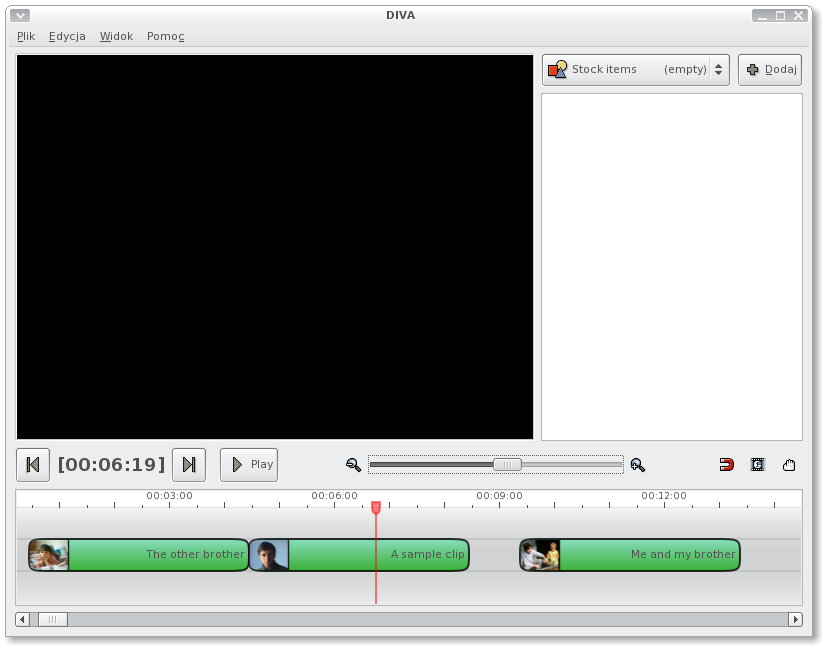
I ported my whole drawing to Cairo:
It’s slightly slower than the pixbuf sprite-based drawing I used before, but hopefully this will improve in future (Glitz?). It’s also much more sane in programming terms, since all the pixel-grain anomalies are gone.
Screenshots are cool, but I feel a need to elaborate on the technology behind Diva. Here is the first issue of the series.
In it’s quest to be scalable & universal, Diva is backend-based. Backend
is a glue between your media files & the output device(s). Think – DV
Backend, MJPEG Zoran Hardware Backend etc. . Basically, backend is a _workspace
format_ in which you want to work (however – actually it’s the backends that provide
formats, ie. DV Backend provides Full-PAL format and Half-PAL format).
Backends don’t really do any data processing (they can though) but they merely
“instruct” the engine how the data should be handled.
A real life example: You’re editing a movie of your wedding. You’re working in a
Full-PAL DV Backend since you’ve got your files/media captured from a
camcorder in this format (768x576 25 frames per second, 48kHz 2channel 16 bit
audio). Now – you’d like to mix-over this cool David Bowie’s song that was
aired in the background when you first met your future wife at the pub. The mp3
file is 44kHz audio. The backend will decide that this format difference (44kHz
vs. 48kHz) can be handled real-time via converting. No extra interaction at your
side necessary, you can just import the file.
Later on you realize, that this kind of boring wedding-videos are interesting only to your mam & dad. So you decide to spice the thing up with some cool photos you’ve got on your digital camcorder. These are 4000 x 2000 JPEG files. Because the CPU cost of quality down-scaling is too big, the backend will offer an option to recompress the photos to the native format (more or less automagically).
Summarizing, the whole idea behind backends is to:
DV hardware backend
that outputs to firewire)Backends, like everything else in Diva, are pluginable.
Powered by Mephisto with a micro theme mod
10 Comments
How are you implementing this in Cairo? Are you using that Mono.Cairo? Or a glue library? Or System.Drawing? Or anything else?
Tnx
I’m using Mono.Cairo from mono SVN + custom patches + (smallish) glue library. Hopefully all this will make one day into Mono.Cairo.
Like the new look of the clips with the thumbnail positioning and all – although the black border around the clips looks a little thick.
@Jake
Agreed, I think they’re too thick. The problem is, that thinner lines look very blurry. This seems to be a Cairo issue.
I’m not sur using cairo for the timeline is a good solution: compared to the post of the 5th august, the timeline seems less sharp and a bit uglier.
1px vectorial lines will always give you blur problems. If the vectorial line coords are between 2 screen pixels, the 2 pixels will be 50%gray… You have to round your coords to avoid this.
Why do you want to put some vectorial stuff here? I dont see the use. And I think that the old timeline was really good…
I must emphasize how pleasing it is to have a developer who is taking on such an important/interesting project to take time out to let people know what’s going on behind the scenes. kudos to you! I really looking forward to the first release, unfortunately I’m just a scripter, not a fully fledged programmer, in future I hope to at least contribute bug reports ;)
“Agreed, I think they’re too thick. The problem is, that thinner lines look very blurry. This seems to be a Cairo issue.”
As Ron pointed out, this is because Cairo coordinates actually point to the intersection between pixels. So to get crisp lines, you simply have to add 0.5 to all coordinates. A little weird, but once you got it everything is wonderfully sharp.
Ron: Would you say that this looks blurry? :) http://213.133.111.182/Temp/Screenshot-Calculator5.png Aside from the frame border it’s all vector graphics using Cairo.
looks like a good project. just a quick question. will DIVA support multiple layers of video? i have been working on video footage of a play, filmed with several cameras. i needed to be able to put a wide shoot on one layer, and drop close ups on top. with out layers it would have been very hard to make this work. i could not find any linux editor that let me do this, so i had to use apple’s final cut. is layering a planned feature? is it a very difficult thing to implement?
anyways, good luck. cant wait to have a play with the diva.
sam
@Daniel Thanks for the tip… now it looks much better.
@sam It will suport multiple layers. The “tracks” you see on the shots are actually layers. There is no any compositing code yet, but there is sound mixing (errr… not yet ported to 0.9)
I consider simple compositing (like – giving an alpha for a clip) one of the basic features. More advanced stuff (like – scaling clips and floating them around) will surely come one day, but that’s pretty hard to do.
@Ron: Don’t bash it so early ;) Thanks to Daniel I have something much nicer now, soon to be demoed with the whole thing. Cairo is not only for eye-candy – it’s much more sane for me to handle it this way.
Just stumbled upon the site and had to send some encouraging words! This is by far one of the best looking app’s I’ve seen for Linux. I really look forward to see where it goes.
Sorry, comments are closed for this article.