HIG

09.Jul.2005

Tomorrow I’m starting to work on the user interface for Diva. libGdv is functional enough to provide me with the basic features needed for timeline compositing. I took a refreshing look at the most popular video editing tools – from the interface point of view:

  • iMovie – 1 ; 2 ; 3
  • FinalCut – 1 ; 2
  • Adobe Premiere – 1 ; 2 ; 3
  • Pinnacle Studio 9 – 1

iMovie and Studio 9 are targeted at the “home market”. FinalCut and Premiere claim to be “professional” products although only one of the two deserves that name (when I last checked audio clips in Premiere could be aligned only to a per-frame grid. Very cheap).

Now, I had a chance to work with all the apps listed above. Studio 9 is bundled by default with the otherwise good Pinnacle DV cards. It’s an example of a very bad user interface approach: “Jane users will use this software. So let’s make some shiny custom controls so that the Jane user will have something to stare at. Let’s make sure it stands out from the rest of the system so that Jane will feel that she’s actually doing something cool”.

This software is not really usable. Just take note how much screen estate the timeline control takes in comparison to the play window. It’s not adjustable. Notice, how the thumbnails are cut because there’s not enugh space to display them. It’s obviously misleading to the user (in contrast to this behaviour in mac products).

iMovie is the hero of the day anyhow. The interface is very clean and usable. I’ve seen people having problems using word processor, but I’m yet to see someone having problems with iMovie. Apart from the obvious aqua-prettiness it’s all about limited information. iMovie doesn’t overwhelm the user with all the possible tools you might need. I just presents the ones you’re most likely to use. And it presents them with a clear meaning (it’s evident what the controls do – zoom in/out, speed in/out…). On the other hand Studio 9’s timeline is surrounded by smallish icons without meaning. And the most desired tools (zoom in/out and timeline navigation) are not accessible enough. My particular fav is the undo/redo arrows in the upper right corner. What is this supposed to be? If they placed them on the left side it could (at least) have something to do with a web browser.

In Diva I’d like to follow the Gnome way of doing things – aesthetically. There is an important difference between “aesthetic” and “simple”. Aesthetic doesn’t mean “useless for the power user”. My all time Gnome HIG favs are Muine, Evince and Sound Juicer. These tools are easier to use then their Windows equivalents. Now, if we could only make DV editing that easy…

In other news: I’ve seen “Being There” with the amazing Peter Sellers last night. Highly recommended.

 [just before a live TV show]
 Morton Hull: Do you realize that more people will be watching you tonight,
 than all those who have seen theater plays in the last forty years?
 [pause]
 Chance the Gardener: Why?

The very last shot has blown me to pieces.
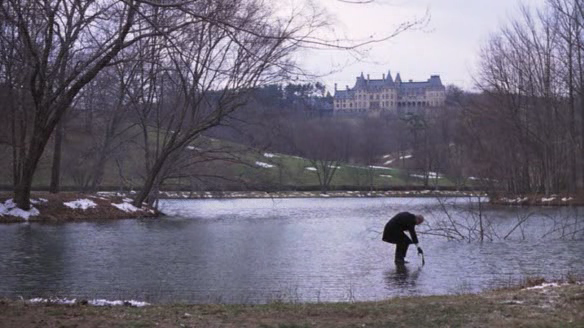
Being there

5 Comments

Perhaps this is not the most fitted place to write this, but I was wonderring - What about capturing? Is DIVA going to support video capturing? If so, how? I am only asking since I did not find any cross platform VIVO library (There is the V4L and VFW, there is libDV for linux, but I couldn’t find anything that is cross platform).

That’s an important issue.

I’m not going to add capturing support until I get the “core” of Diva video-editing functional. But capturing IS very important. I’d LOVE to see one day a totaly plug&play camcorder support on linux (like: you plug a firewire cable, a window pops-up…). I’m wondering if this could be possible now with hotplug.

DIVA is going to be cross-platform among *nix platforms, I’m not much interested in the VFW stuff. I guess I’ll just implement capturing via Gstreamer. For example now GStreamer supports certain V4L sources (like Zoran-based MJPEG cards). On other platforms people will just have to write proper GStreamer elements and Diva will use them. DIVA will be crossplatform as much as GStreamer/Gnome/Mono/Gtk is. I think that means Linux, FreeBsd, Solaris. I have no idea if FreeBsd/Solaris has any kind of firewire/vivo support at the kernel level (yet).

more than less than easier than

if then and then I then

Premiere does sample-accurate audio editing, you just have to change the timeline units to samples instead of frames.

Also, here are some screenshots of Avid DS Nitris 7.6, which you will probably never get to use, unfortunately:

Basic editing: http://ywwg.com/images/ds_shots/ds01.png

Color Correction: http://ywwg.com/images/ds_shots/ds02.png

bezier effects timing editing (value vs time): http://ywwg.com/images/ds_shots/ds03.png

Graphics mode (for scratch and wire removal): http://ywwg.com/images/ds_shots/ds04.png

Node-based effects editing (analogous to gstreamer): http://ywwg.com/images/ds_shots/ds05.png

Things to note:

  • items that look like buttons are sometimes buttons, or tabs, or menus.
  • many features are hidden in rightclick menus, and often these right-click targets are mere pixels wide
  • 2-d effect timing is very cool
  • Node-based editing is considered very high-end, and is very cool

That looks really like big-balls proffessional stuff ;) But very cool indeed. I haven’t got a chance to work with Nitris, but during my last movie project I was offered to edit on some-kind-of-avid with a pro editor. I didn’t use this chance, instead I edited on Premiere at home. I did that because I wanted to take my time and polish every single cut without time limitations. AVID time would have been limited (budget). Since this was a 35mm cinemascope motion tape project I didn’t need any of the (cool) effects on AVID etc.

And now comes the funny part. Since edl/omf exporting in Premiere sucks badly, I wasn’t able to export my work for the lab. So I (sic!) manually re-written all the TCR timecodes for every single cut (about 140 of them) to an excel spreadsheet. Fortunately the TCR and timecode were burnt-in on the DV material I was editing. Later on I exported the spreadsheet to a text file (sic!) and using a custom-built console application formatted that to a valid EDL file.

You wouldn’t believe it, but I didn’t make a single mistake. The negative was cut at the lab in Berlin without a smallest glitch. After that, it was scanned in 4k and digitally color-corrected at Pictorion Das Werk. Now it’s being burnt back to 35mm on Arri Laser.

It was a funny experience but I don’t want to repeat that ;)

Sorry, comments are closed for this article.

back to top

Powered by Mephisto with a micro theme mod